4.4
Free
DROFUS
Create Bootable USB Device Windows/Linux
-logo.webp)
View an ad to download for free
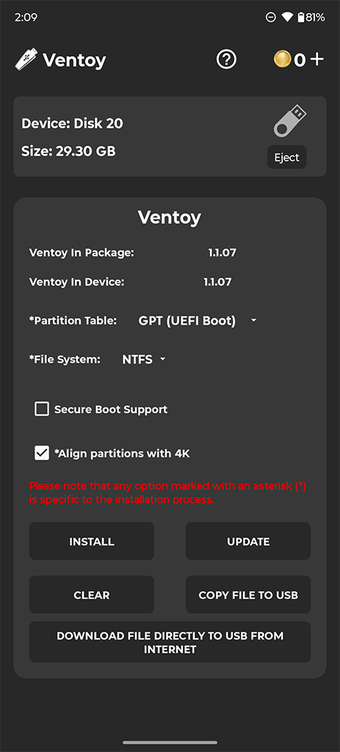
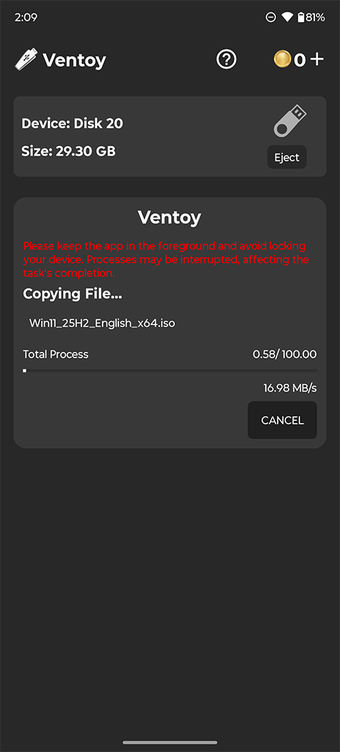
Ventoy — Multi-Boot USB Creator for AndroidCreate multi-boot USB drives with dynamic ISO menus—no PC required.Ventoy is a standalone Android tool for building multi-boot USB drives. Just install once, then copy ISO files directly to your USB—no need to reformat or reburn. Boot any supported image from a dynamic menu with full control over partition schemes and file systems.️ Core Features• Create multi-boot USB drives with ISO boot menu• Supports Windows 7–11 and all major Linux distributions• Manual selection of partition scheme: GPT (UEFI) or MBR (Legacy)• File system support: NTFS, FAT32, EXFAT (FAT32/EXFAT require Pro)• Add or remove ISOs anytime—no reburn needed• Copy ISO files or download them directly to USB Coin UsageCoins are used for core Ventoy operations. You can earn coins by watching rewarded ads or buy them directly.Coin-required actions:• Install Ventoy → 2 coins• Update Ventoy → 2 coins• Clear Ventoy → 2 coinsFree actions:• Copy ISO files to USB• Download ISO files directly to USBWant unlimited access?Upgrade to Pro to unlock all features, remove the coin system, and use the app offline—even with ad blockers. Ad-Supported ExperienceVentoy includes banner ads and rewarded video ads to keep core features free.Upgrade to Pro to:• Remove all ads• Unlock unlimited access• Disable the coin system• Use offline and with ad blockers️ Notes• Internet required unless using Pro• Disable ad blockers unless using Pro• Keep the app in the foreground during USB operations• If USB isn’t recognized after setup:– The USB is likely working correctly– Test it on a PC to confirm– Use FAT32 for better compatibilityDownload Ventoy now and boot smarter—right from your Android device.
Create Bootable USB Device Windows/Linux

A full version app for Android, by Samuel Buehrle.

Multi-OS emulator for mobile
Before downloading, you can take a quick look at the permissions this app may request on your device. App permissions allow certain features to work properly, such as accessing your camera to take photos, your location for maps, or your storage to save files.
In this section, you’ll find a clear and simple overview of the types of permissions the app uses, grouped by their level of sensitivity, along with a visual breakdown to help you understand them at a glance. This way, you can see how the app interacts with your device and decide to download with confidence.
Permissions that allow the app to access personal or sensitive information stored on your device, such as location, contacts, camera, or microphone.
Information the app may gather from your device or usage activity to enable features, personalize content, and improve overall performance.
Information that may be shared with trusted third parties to provide services, support app functionality, or deliver relevant content.
This report summarises the permissions declared by the app at the time of scanning and groups them into Privacy, Data collected and Data shared. A declared permission shows what the app can access, it does not necessarily mean personal data is collected or transmitted. For full details check the app’s privacy policy and the developer’s clarifications shown below. Softonic generates this report automatically from the package metadata; it is informational and not a substitute for a full security or privacy audit.
.png)
.png)
Free
Android
Android 11.0
English
31.3K
80.45 MB
APK, Google Play
1780684321299-26911964-ventoy_1001009.apk
View an ad to download for free
Have you tried Ventoy (Unofficial)? Be the first to leave your opinion!
Add reviewCreate Bootable USB Device Windows/Linux
A full version app for Android, by Samuel Buehrle.
Multi-OS emulator for mobile
![Icon of program: ISO 2 USB [NO ROOT]](https://images.sftcdn.net/images/t_app-icon-s/p/d5be8910-568b-4221-b851-248373949c29/2283552767/iso-2-usb-no-root-logo)
Bootable USB creation without root on Android

Bootable USB drive creation tool
-logo.webp)
Multi Tool For USB Devices

ADB Connect (No Root) - Review

A free app for Android, by Chainfire.

Bijoy Keyboard: An Android app for writing Bangla in Unicode system

Bugjaeger - A Tool For Android Developers
Experience a new side of your device
Your guide to satellite antenna installation

Optimize PUBG and BGMI Graphics Effortlessly

Internet connection optimizer for mobile gaming

Efficient File Management with RylenClean

Efficient File Management with PryenClean

Efficient Local Photo Editing App

Unique Couple Photo Widget for Android

Comprehensive Health Promotion Tool for Dengue

Efficient Call Blocking with Skipple Shield